WP Glideshow Wordpress Plugin

Pluginbeschreibung:

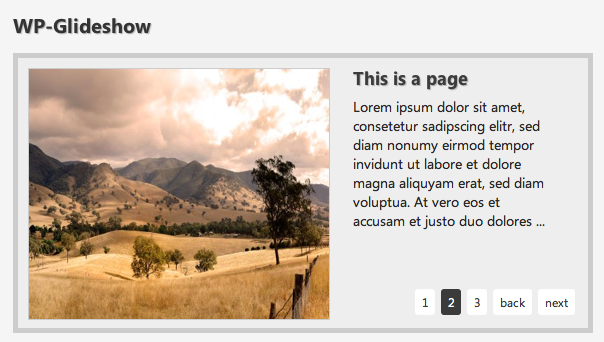
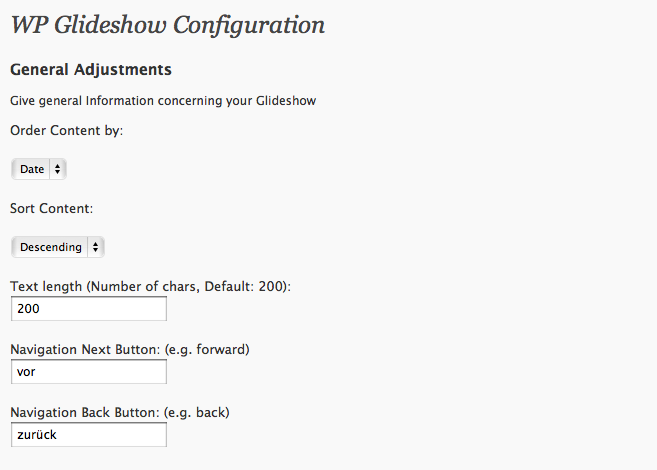
WP Glideshow – Das Wordpress Slideshow Plugin, ein Must-Have für jeden Wordpress User. Mit diesem Plugin können Sie ganz einfach eine komplett anpassbare Slideshow in Ihre Wordpress Website integrieren. Das Plugin bietet jede Menge Optionen für den Administrationsbereich. Vom Sliding Speed bis hin zum kompletten “Styling” findet man hier alle nötigen Einstellungen. WP Glideshow läuft standartmäßig mit autorotate aber auch dies kann man ausstellen. WP Glideshow zeigt beliebig viele Posts mit Image, Title und Excerpt (Anzahl der angezeigten Zeichen veränderbar).

Screenshot:

Installation:

Zur Installtion müssen Sie lediglich das komplette Plugin in Ihren Plugin Ordner (wp-content/plugins) hochladen. Dann gehen Sie im Adminbereich auf Ihren Plugin Bereich und aktivieren das Plugin.
Jetzt müssen Sie nur noch folgenden Codeschnipsel in Ihrem Theme unterbringen (z.B. in der index.php direkt unter der Navigation)
<?php include (ABSPATH . '/wp-content/plugins/wp-glideshow/glideshow.php');?>
Unter Einstellungen/WP Glideshow können Sie in Ihrem Adminbereich jegliche Änderungen an dem Plugin vornehmen. Sie können viele Designeinstellungen und natürliche einige Pluginspezifische Einstellungen vornehmen. Um Bilder in der Slideshow anzuzeigen, müssen Sie ein benutzerdefiniertes Feld erstellen mit dem Schlüssel “Featured” und mit dem direkten Link zum Bild (z.B. http://www.iwebix.de/wp-content/themes/iwebix/images/webdesign-angebot.jpg) als Wert.

Perfekte Bildgröße ist 540×250 Pixel.

Demoversion: hier geht’s zur Demoversion

Download:

  wp-glideshow.zip (174.4 KiB, 1,021 downloads)

Viel Spaß mit dem Plugin!

75 Kommentare »

  1. mon012 says:

    Deeply thanks,for your pretty good plugin,
    …but i cant run it on my first page(home static)
    i try to the php code on page.php but it failure show.
    help me,please.

  2. David Brooks says:

    Hi
    This plugin is looks great but I can’t get it to work.
    I have a category called Featured and my new posts have a custom field of ‘Featured’ and a value going to the picture but nothing comes up in the slideshow.

  3. admin says:

    Hi mon012,
    I think you didn’t included the PHP code correctly please make sure that you have entered correct abostrophs and you got the right path.
    If you want it to show on your static Home Page you will have to put it in your index.php/home.php as Template File.

    < ?php include (ABSPATH . '/wp-content/plugins/wp-glideshow/glideshow.php'); ?>

  4. admin says:

    Hi Brooks did you entered the required fields in Settings/WP Glideshow?
    You have to enter the category ID and number of Posts you would like to display

  5. mon012 says:

    thanks for your answer,admin
    but
    i tried to put it on …/wp-content/themes/satorii/index.php
    and result didnt show at the first page but it show as a texttype in other post.
    now i have no idea where to put it in that file.
    i hope it will work soon,help me..

  6. Many says:

    Hi,

    first thx for your great work.

    I got one question : does this plugin also support featuring pages or is it only posts ?

  7. cbt says:

    Nice plugin if I can get it to work. I have the same issue as David. I did the category, added this to my template:

    When I view source I see all the img code and the post text but it doesnt show up at all on the glideshow at all. I just see the background color. Tested it on FF Mac, Chrome Mac, Safari Mac and Camino Mac.

  8. admin says:

    Maybe this could be a Javascript error, because maybe you have to add jquery-1.2.6.min.js manually to your theme.

  9. admin says:

    Hi Many,

    i’m sorry but in wordpress it is very hard to add Pages instead of Posts to a Slideshow, because you don’t have “Page Categorie” and some other necessary stuff.
    If you would like to add your Pages you would have to do this manually by adding it to your template file.

  10. Robert says:

    There is error in IE7/8. On this website also. Makes the plugin unusable.

    Message: ‘jQuery’ is undefined
    Line: 8
    Char: 1
    Code: 0
    URI: http://www.iwebix.de/wp-content/plugins/wp-glideshow/scripts/slider.js

    Anyway to fix this?

  11. admin says:

    Hi Robert,

    thanks for Bugreport, is fixed right now.

  12. admin says:

    Wait a second until Wordpress updates the Javascript File in the Package

  13. Thorsten says:

    Hallöchen auch von mir,

    ein suüer plugin hast du da geschrieben. Leider hab auch ich kleine Probleme. Kann ich dein Plugin auch auf einer Seite und nicht in einer Kategorie verwenden? oder auch auf Seiten linken statt auf id´s?
    über eine Antwort würde ich mich echt freuen.

    gruß Thorsten

  14. admin says:

    Hallo,

    ja so ist das ganze gedacht, Du kannst das Plugin einfach in deine index.php oder z.B. in deinem Template File packen.
    Pages kann man leider nicht einbinden, da diese ja keine Kategorien haben und auch keine Custom Fields etc.

  15. Don Kong says:

    Hallo admin,
    euer plugin ist wirklich eine optische Bereicherung für meinen Blog wie ich finde, danke dafür.

    Ich habe jedoch ein Problem damit. Seit ich die WP Glideshow aktiviert habe gehen alle internen Links meiner Seite wie, Links auf pages und posts auf nur noch auf die Hauptseite. Habe ich vielleicht etwas falsch gemacht?

    Don Kong.

  16. Don Kong says:

    kurzer Nachtrag,
    die URL’s der Unterseiten sind nach wie vor die selben es wird aber trotzdem nur die Frontseite im Browser angezeigt.

  17. admin says:

    Hm, das ist eine wirklich merkwürdige Angelegenheit, mit der ich so noch gar nichts zu tun hatte. Hast du denn eine page.php in deinem Template oder nur die index.php?
    Und ohne die Glideshow funktioniert alles ohne Probleme?

  18. Don Kong says:

    Danke für die Antwort, ich habe den Fehler bereits selber gefunden, ich hatte den code fälschlicher weise in die header.php gesetzt nicht in die index.php. Jetzt funktioniert alles bestens.

  19. admin says:

    wunderbar, schön das Dir das Plugin gefällt.

  20. felix says:

    danke für das super plugin! leider sehe ich keine bilder aber trotzdem den text? was mach ich falsch?

    lg

  21. admin says:

    Hallo,
    hast du ein Benutzerdefiniertes Feld “Featured” und dem Link zum Bild also z.B. http://www.iwebix.de/bild.jpg in den betreffenden Posts angelegt?

  22. Manuel says:

    Hello, thanks for you amazing plugin, i have a problem, the images from the post, they dont show in the slide :S you now this bug or i make something wrong?

  23. admin says:

    Well I think that you made a mistake while adding the
    Custom Field. Please make sure that you named it
    Featured (case sensitive). The value hast to be a direct
    Path to the image (no relative).
    Cheers

  24. Manuel says:

    Thanks dude, now works perfectly, I admire your work has saved me

  25. sapitomojado says:

    Can you explane me, step by step, how i have to do to show the image???
    Sorry my english is very bad (Im from Spain)
    Thanks for you answer

  26. sapitomojado says:

    I have the answer, its very easy…
    thank you.

  27. Pedro Lima says:

    Please, can you do a VIDEO tutorial for this plugin?

    I can’t understand how i put the images in the slideshow.

    Please, some help

  28. Don Kong says:

    Hallo nochmal, leider ist das Problem, das auf allen Unterseiten nur die Frontseite angezeigt wird wieder aufgetaucht trotzdem ich den Code in die index.php eingesetzt habe.
    Die einzigen Unterseiten die korrekt angezeigt werden sind die einzelnen Blogpostunterseiten.

    Musste das Plugin darum leider deaktivieren.

  29. admin says:

    Hi,

    weißt du wie man ein Template in Wordpress anlegt? Dann würde ich dir raten für deine Startseite z.B. eine home.php anzulegen und nur da den Code einzubetten.

    Für das Page Template lies dir das mal durch: http://codex.wordpress.org/Pages#Page_Templates

    “Creating your own Page Templates”

  30. Don Kong says:

    Hab vielen Dank für die Antwort aber so weit, jetzt noch das Template zu modifizieren, wollte ich garnicht gehen. In der Hoffnung, das irgendwann eine Version erscheint die mit jedem Template ohne Umbauten funktioniert verbleibe ich mit freundlichen Grüssen.

  31. Andrew says:

    First of all, thanks for your great service.
    Can you please tell me how to identify ‘what is my category id’
    (Sorry my English is so bad)

  32. admin says:

    Hi,
    You will find your category ID in your admin
    Area. Go to Articles, Categories then click
    on one category and have a look at the URL.
    There is the category ID something like cat=35
    Cheers

  33. Hi:

    Congratulations on a fantastic plugin. I just wondered if we can put “post excerpt” at the place of the (default) 460 text characters? If yes, what changes are to be made and where?

    Wishing you a Merry Christmas.

    Awaiting your kind reply,
    Thanks,
    Anshuman

  34. admin says:

    Hi,

    thanks for your kind christmas wishes, merry christmas to you!

    To add “the_excerpt” you have to search in glideshow.php for “< ?php the_glide_limit($chars); ?>”
    replace this code with “< ?php the_excerpt();?>”

    This will solve your Problem!
    Have fun with this plugin!

  35. Hi there:

    Thanks for the reply. It is much appreciated.

    I would be grateful if you could guide me with this one last bit:

    The glide-text headline and the body text have somehow got CENTER ALIGNED. I have tried my bit but could not make the two LEFT ALIGNED.

    Please let me know where things have gone wrong at my end.

    Thanks,
    Anshuman

  36. Dear Admin:

    Any solution to my above query?

    While I had cracked the excerpt problem in a few minutes (I am sorry for not informing you of that and thank you for providing me with the solution), I am just not able to understand what the issue with the alignment is. You – and others too – can have a look at the

    http://www.indicpost.com to see what I am saying.

    I want the glide headline and glide text to be left aligned. Though I tried many tweaks, it is still center aligned. :-(

    Any help would be appreciated.

    Thanks,
    Anshuman

  37. admin says:

    Hi Anshuman,

    did you try to add “text-align: left;” to the .glidecontent class?
    You have to add this in glideshow.php where the styles are declared.

  38. admin says:

    .glidetext {
    width: 228px;
    margin: 0px 0px 30px 20px;
    color: #000000;
    float: left;
    text-align: left;
    }

    this works I just tried with firebug!
    Cheers

  39. Hi:

    It indeed works! :-) I did try that once or twice but not sure why it didn’t work earlier. :-( I am sorry if I bugged you with elementary things. I am actually a journalist and not a techie.

    Wonder if you are into soccer or not. But if you are, how do you say “step up the game, Ballack” in German? :-)

    Have a great holiday week ahead. Give a buzz if you ever come to India.

    Thanks again for the support.

    Best,
    Anshuman

  40. admin says:

    Hi,

    you’re welcome, of course I’m into soccer, and in Germany we would say something like “Ballack, hau ihn rein!” (:

    Have a nice holiday too, yes and you give me a buzz if you will ever come to Germany.

    Best,
    Dennis

  41. Hi:

    Thanks for the invite! Now all I need to do is to earn enough money to be able to visit your magnificent country. :-( :-)

    By the way, my message for Ballack was only for his recent form with CHELSEA FC (EPL) – I’m not aware of his form with your national side. :-(

    We do get the Bundesliga LIVE here in India too. See some matches on and off – especially of Bayern and Wolfsberg – but not as much as those of EPL.

    India’s most popular sport is Cricket. Just a trivia (that you never needed? :-) ) for you.

    More later,
    Anshuman

  42. Patrick says:

    Ich habe mein WP als CMS zmgebaut und erstelle Beiträge quasi nur als Seite (Page). Gibt es denn keine Möglichkeit das Plugin dennoch für Pages zu nutzen (Das mit der Cat ID muss man doch umgehen können). Ausserdem finde ich es sehr schade, dass es bisher keine wirklich brauchbare Installationsanweisung gibt. Wo genau in der index.php den Codeschipsel einfügen ? Wo Bilder für die slideshow einfügen ? Habe ja nur 2 Felder ohne default Einstellungen:
    Category ID of Featured Posts: UND Number of Featured Posts: —
    Also solch ein Pluging mit “richtiger” Installationsanweisung sowie install-auswahl zb; pages, post, index und eigenständiges Textfeld im Adminbereich inkl. Bildurlfeld wäre mir als premium version auch ein paar Euros wert ;)

  43. levi says:

    Something’s wrong, wp slideshow has the same issue as wp glideshow. All works well, just doesn’t slide and the images(slider) are width:0px height:0px; I’m working for a few hours now and I really tried everything, even reinstalling all the scripts.

    Alles gute,
    Levi

  44. admin says:

    Hi,
    that is not a Problem of my Plugins. The Problem is, that you probably have Jquery already included by your Theme.
    All you can do is delete Jquery in your Header (or adjusting the Plugin)
    Cheers

  45. andreas-twk says:

    Hi, from colombia !!!,

    I have install the plugin and looks good,

    but the navigation of my site has been damaged, why ???

    You know why use this plugin causes this ???

    Gracias,

  46. Bob Wells says:

    Is there a way to have Glideshow display the text of the Excerpt from the Post, rather than the beginning (up to the “more” tag) of the actual Post?

  47. Kerem says:

    Is it possible to use this plugin in a single post rather than in EVERY post or on a homepage?

  48. Sonsey says:

    I have a weird issue… when I choose my category id in the settings, the main page below the plugin also shows ONLY that category… in other words if I choose category id 4, no other categories will show up in my blog…Otherwise works like a charm!

  49. i have the same problem as Sonsey, and thats not the only addon with that problem. i assume wordpress update changed something

    same problem occurs when all addons are diabeled, and on fdifferent themes as well AND on different wordpress blogs.

    same problem occurs when i use wp slidebar or something addon ( it alsu used categories to fetch featured posts )

    please help us ;]

  50. @Sonsey

    paste this to your theme instead of your glide code

    it worked for me

  51. ok the code cant be pasted in. check my website and look at the source guys!

  52. Sonsey says:

    Thanks David, I can see it works, and the additional java call in yours that mine doesn’t have, but I can’t see what you actually added to your php code…

  53. (trying to paste the code once again )

    include (ABSPATH . ‘/wp-content/plugins/wp-glideshow/glideshow.php’);

    rewind_posts();

    add the php markups please.
    and dont bother visiting my site – after all you cant see php script while viewing the source ;/

  54. Sonsey says:

    Thanks… and too late… I already bookmarked your site! :D

  55. Sonsey says:

    As an FYI… the rewind_posts() call DIDN’T work on my theme (SEO Basics) however adding a wp_reset_query() DID work…

  56. [...] Eklenti Ana Sayfası Etiketler: Daha, Indir, Kolay, Linkler, Lt, Php, Plugins, Resim, Resimler, Wp Bu yazıyı paylaşın! [...]

  57. Matze says:

    Ist es (ohne großen Aufwand) möglich, die Slideshow des creativix-Themes durch das Glideshow-Plugin zu ersetzen?

  58. admin says:

    Naja das kommt darauf an wie gut du dich mit PHP auskennst.. Eigentlich musst du im theme nur in der index.php die Slideshow entfernen und WP-Glideshow includen.

    Gruß

  59. Matze says:

    Das hört sich ja, meine rudimentären Kenntnisse berücksichtigt, erstmal nicht komplett unmöglich an ;-) Jetzt habe ich aber noch ein zweites Problem: Ich kann die zip-Datei nicht runterladen bzw. auf meinem Mac nicht öffnen. Könnt ihr mir den ungezippten Ordner per Mail schicken?
    Das wäre super!

  60. Oyvind says:

    Thanx to the author for a fantastic slide!

    And thanx to David Zwolski and Sonsey for solving my problem :)

  61. admin says:

    Hi Matze,
    zieh dir mal das zip von der wordpress.org seite (http://www.wordpress.org/extend/plugins/wp-glideshow/) das sollte funktionieren.

  62. Matze says:

    Astrein, vielen Dank!

  63. Freebird says:

    Hi,
    Is there any way to get a video (say youtube) in the slide insted of using a picture?

  64. [...] Página oficial do plugin / Download [...]

  65. Bastian says:

    Das Plugin ist sehr schön – dank dafür.

    Es hat jedoch ein Problem mit einem anderen Plugin verursacht. Es hat die jquery.min.js neu includiert, obwohl jquery bereits includiert war. Eine Entfernung der jquery.min.js hat das Problem gelöst.

    Gruß,
    Bastian

  66. Freebird says:

    Is there any way to get a video (say youtube) in the slide insted of using a picture?

  67. Hi:

    I have the same query as Freebird (which he has already had to ask twice ;-) )

    It would be great if we can have video and audio files too in the glideshow – and not just images.

    Look forward to an answer to my (and Freebird’s) query.

    Thanks in advance,

    Best Regards,
    Anshuman (India)

  68. samavia says:

    its a really nice plugin… i was looking for this kind of
    plugin ..finaly i got it :)

  69. Hi Dennis:

    Firstly, All the very best for the Quarter Final against Argentina. Hope Ozil, Muller, Klose and Podolsky turn it on again. :-)

    Secondly, can I have the slider text and the buttons (slide number, previous, next) BELOW the image? If yes, which code is to be tinkered?

    I apologise if the query is too basic. I’m just a journalist.

    Cheers,
    Anshuman

RSS-Feed für Kommentare zu diesem Artikel. TrackBack-URL

Einen Kommentar hinterlassen