Plugin Description
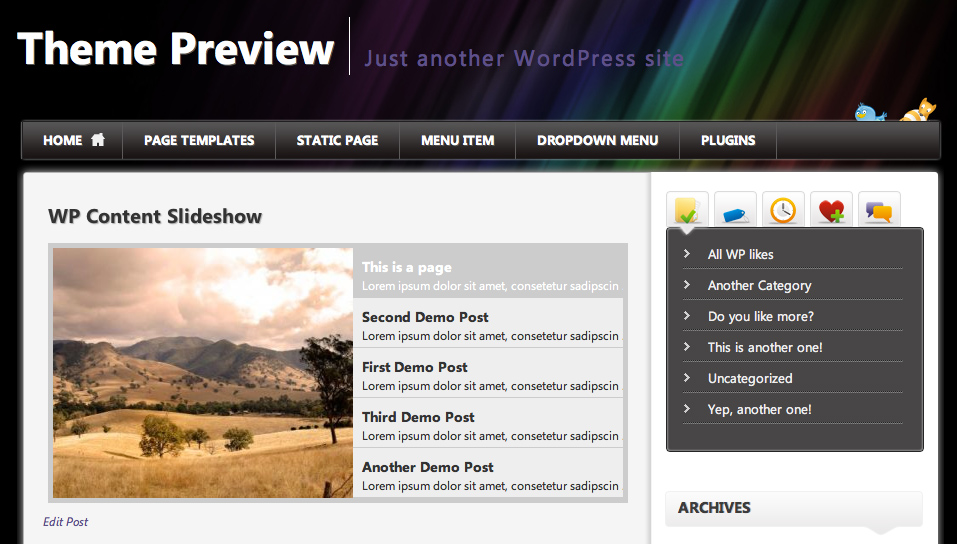
WP-Content Slideshow Plugin is a new, even much better Slideshow Plugin for WordPress. This Slideshow can show/feature up to 5 Posts/or Pages in a very clear way with a text and a featured image for every post/page. This Slideshow has a very nice pre-designed Layout. It shows all the titles and a little excerpt to the post/page on the right. On the left, the Slideshow features the image that was inserted in the post/page via post-thumbnail WordPress feature.
Installation:
Install the Plugin automatically via WordPress Plugin Installation Area or download the newest version of the Plugin right below, extract the files and upload them to your wp-content/plugins folder.
- Download newest version from below
- Extract and upload to your wp-content/plugins folder
- Activate the plugin in WP-Admin
- Insert following PHP Snippet in your template file
<?php include (ABSPATH . '/wp-content/plugins/wp-content-slideshow/content-slideshow.php');?>
- Or you can use [contentSlideshow] as a placeholder in your Post/Page to insert the Slideshow
- Now Edit a Post or a Page and scroll down to „WP-Content Slideshow Options“ which should be right below your Editor
- Choose „Feature in WP-Content Slideshow“ and set an Featured Image („Feature Image“ when Editing Post/Page)
- Now save the post/page and have a look at your Slideshow!
- The image will be automatically cutted so that it fits the Slideshow (No need for timthumb anymore – Version 2.1)
- You can adjust Settings, Layout under Settings – WP-Content Slideshow
Demo:
Download:
Troubleshooting:
Thumbnails are being generated automatically via wordpress built-in functionality. There is no need to support timthumb anymore. If you are already using the plugin with images, you will need to regenerate thumbnails (regenerate thumbnails plugin). If you are customizing image-size you will need to regenerate as well!
Enjoy this new Slideshow WordPress Plugin
Dieses Plugin wird zusätzlich gesponsert von Brustvergrößerung Hannover.













hi, I was using the previous version, but because was a conflict with the template / pagination problem, I updated the plugin , but now it’s not working – slider doesn’t do anything. Please help!
Hi,
I am hongwan.
I am trying to implement this plugin in my site. But it got an error.
Is it because I use headwaytheme?
I try to work around the inserted code via:
my error:
Fatal error: Call to undefined function feat_thumbnail_src() in /home2/oozaooza/public_html/wp-content/plugins/wp-content-slideshow/content-slideshow.php on line 169
still will not work. Will you mind providing my some advice?
I installed the plugin; it works, but I can’t change the configuration. Any change I make doesn’t change the layout. (chmod of whole plugin-directory = 777).
And how can I change the order of the 5 items?
SUGGESTION for next version : add a [read more] tag above the picture. I couldn’t figure out how to click to the post, until I clicked the figure by accident…
Darf ich das Copyright unter dem Slider entfernen? Das würde ich dann als Kommentar in den Quell-Text packen. 🙂
thaxs for plugin
Hey,
just wrote a review on this plugin. If you have comments or want to rate it you find it here: http://best-plugins-for-wordpress.com/wp-content-slideshow
By the way: cool sponsor you have there 😀
Hey,
thank you for your review. I have no problems with this plugin – it works perfectly!
Greets
New 2.1 update seems very good – thank you!
Please note – „Set Image Height“ in the Configuration screen, does not keep/update data input.
Vielen Dank fürs Plugin
I noticed an error in the content-slideshow.pfp css in the 2.1 version, the height and width of the ul and li are hardcoded and don’t respond to custom image sizes. Setting these values the same as the img fixed the problem.
Really awesome plugin you created here.
@Micheal: That was just was I was looking for.
Thanks
Jens
hi can you change
the effect from fade to scroll ?
thanks
http://www.thegreeneconomy.com/testing-slideshow/
We want the image to be wider. Tried everything, but still too narrow. [see link above]. I have changed width in the settings, uninstalled and reinstalled, etc. I can change the width of the navigation (right) side, but not the image. Please help. Tana
Have a look at the style that is included with the slider.
Somehow width and height doesn’t apply to the element:
#content-slideshow .content_slideshow ul li {width: 300px !important;
height: 250px !important;
}
you may set your values (image width/height) manually.
Cheers
is there a way to set/change the order of the slides/posts? neither date published nor order seems to effect it 🙁
Is there anyway to change the order of the featured items?
I have changed the end of my excerpt from „…“ to „learn more…“ and would like that to also link to the post, is it possible?
Hi there
I would love to know how to do the following or where in the code do I need to make changes:
When you mouse-over the text it shows the image associated with that text and then when you click on the text you are brought to that page/post.
Is this possible, any direction would be much appreciated.
C.
Hi,
I’ve implemented the plugin and got the sizing sorted out. It looks good, but one thing: I am using this to feature pages, rather than posts at the moment, but when I add content to the „excerpt“ field, it puts the excerpt on a second line, and breaks the links. I’d really appreciate your input on this!
Many thanks,
Jason
Sorry, to add to the above post: It appears excerpts are going on a second line for Posts as well.
Thanks for your help…
Hi, Thanks for the great plugin!
I’m using it on one of my websites http://www.languageonthemove.com and everything is going OK except delayed appearance on the first page. Exactly, when I select „Featured post“ in admin panel, the post appears in the slider 24-48 hours instead immediately. I do not use any caching plugins on the website and I also tried to use but it does not work too. I was wondering if you could help me with it because my first page slider features „Latest blog posts“ but they show up in 1-2 days 🙂
Thanks a lot for any help.
What is its license? We want to adpat it and also make it part of a theme we are working on, but we don’t know if the license terms of your plugin will allow us to do it.
Hi webix,
Congratulations for your impressive scripts and for sharing them with us!!! Really thank you.
I installed your great „WP-Content Slideshow Plugin“ with another image slider i found around but as i see the jQuery of these two scripts conflict, and WP content slideshow stops. I searched in the internet and i read that i must use jQuery.noConflict() command, but i have no idea how to do it and where to do it.
I would really appreciate if you could help me with this problem. Your script is really excellent and i want to use it!!!
Thank you in anticipation.
Dimis
Hallo Webix,
mein Englisch ist für soetwas zu schwach 🙁
Ich baue im Moment die Seite für unsere Nepalhilfe um.
Habe das Plugin eingebaut – gefällt mir sehr gut. Leider ein kleines Problem:
Wenn ich auf das Foto klicke erscheint der Artikel – korrekt
Wenn ich auf den Text klicke bleibe ich auf der Seite – kein Link hinterlegt
Ich habe in WP Content Slideshow Configurations – Bildgröße geändert – wird auch vergrößert aber wegen Eintrag in der CSS (300px – 250 px) wird nur ein Ausschnitt angezeigt.
Wäre für eine Hilfe sehr dankbar
Mane
Nachtrag:
Hier der Link zur Seite: http://www.wir-helfen-nepal.de
Hello! Fantastig plugin, is exactly what i was looking for! but one problem i have found.. it displays only the iamge, no title or text… any solution?
Thank in advance!
Hi, i just use your plugin and successfully integrate it with my site. but, there is minor problem, that in navigation menu, my permalink cannot load. so, slideshow navigation cannot be clicked.
so, how i’m suppose to do to fix it?