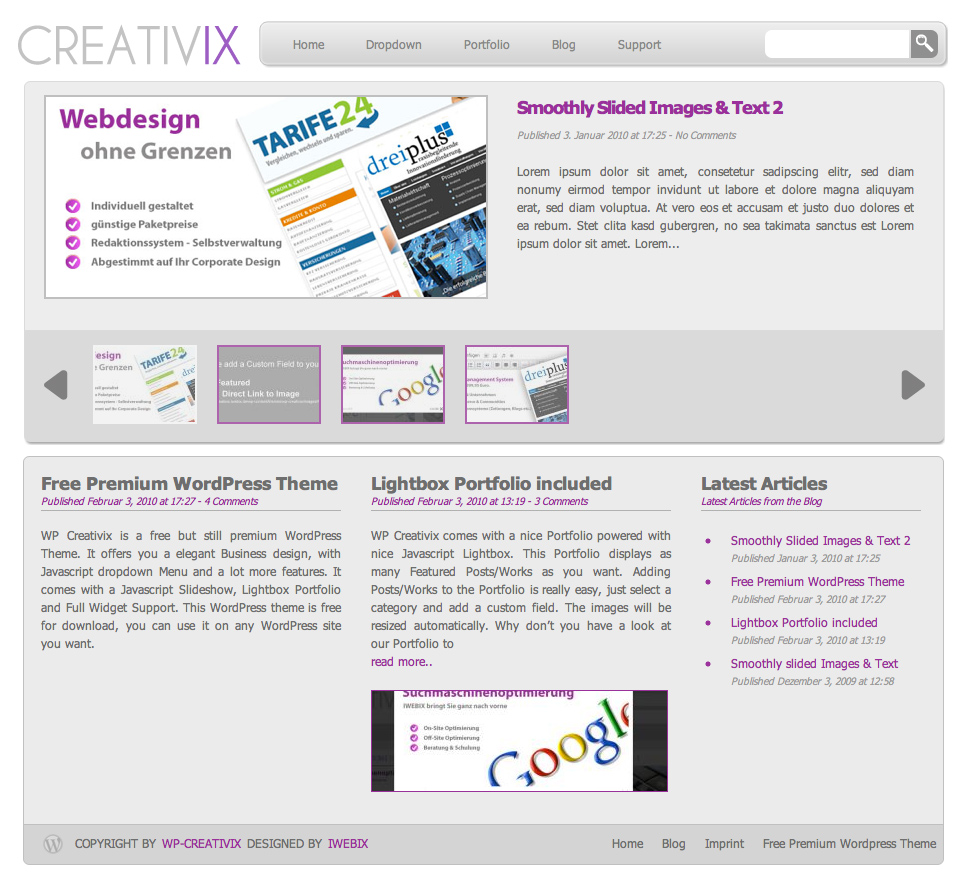
Very beautiful and useable theme, thank you for building it, and also for building such useable plugins.
However, I runned the problem with this theme: the porfolio page seems to be broken (#sub-column’s margin-top seems to be only 50px and that is breaking the breadcrumb bar – when I change it to 72+, it is OK)
Also #searchbutton’s top should -4px instead of 2px (looks to be too in your CSS)
There is also a parse error in your 404 page:
Parse error: syntax error, unexpected ‘<' in /var/www/web870/html/creativix/wp-content/themes/wp-creativix/404.php on line 12
Hi,
i’m right now working on the theme, it’s not yet finished.. Just added Javascript Font Support. Will fix bugs soon.
Which Browser are you using? To me search looks fine.
[...] genauer ansehen möchte kann sich die WP-Creativix DEMO anschauen oder das Theme direkt auf der Downloadseite herunter laden. Dort findet man weitere Informationen sowie eine kleine [...]
So far I’am verry happy with your Wp creation. A clean and well develloped theme.
My question?
On my homepage the first picture in the slideshow is scaled out of proportion. How can i prevent this?
Second?
There is a page called Portfolio on my website. Is it possible to include or exclude posts on this page?
there seem to be some problems on your site concerning permissions. Set permission to /wp-content/themes/wp-creativix/ manually to 755 if not done yet.
Here is the message I get when trying to show the image “remote host “www.edgeoftwilight.com” not allowed”
Maybe you shouldn’t use framesets as well (:
Hi you’re create great theme. But I use Safari browser and found that search button was separate from search box. I donot know how to fix it, Because it work fine on my mozilla.
I have changed the post featured become 4 post on index page. but I found that “The Last Articles” part move to the bottom right of the page. How to fix it please?
Hm..
Safari still needs to be fixed, untill that you should use Mozilla (:
You cannot changing the amount of featured articles on index.php without editing the style.php in the theme. You have to change the width of the container to get 3 or 4 Articles next to each others.
well you need to login to your webspace with FTP, and then go to the right directory (themes) and change Permissions to folder wp-creativix to 755 (sometimes its called chmod in FTP Programme)
I have done as you say. The only problem I seem to have is that the thumbnail does not show. Apologies, I did not know I was using framesets (as I say – complete newbie). How do I adjust this?
Hi,
I’ve changed my permissions but the custom fields still say Name rather than Key. I’m working in Firefox, I’m not sure how to edit these fields. Also, is it possible to change the background with this template?
Thanks so much, I love the clean professional look of this template.
Great theme! (I’m using version 1.2.4) I’ve personalized the theme settings for the Slideshow and Portfolio but the template is using all of my posts. How can I limit this by categories?
Also, it would be great to use the Video Lightbox option with this theme! I am thinking of using this theme with video podcasts.
Hi
This WP theme is really great, thanks for putting it together.
Also MJk thanks for your tip in fixing the searchbutton that is a bit lower. I made the change you suggested and it worked.
One issue I have not been able to solve yet is, I have been having trouble changing the highlight colour from purple to blue.
I have gone to the Themes Settings and Adjustments page, entered 0066CC which is the hex colour code for the blue I want to use and it is not changing.
Your theme is incredibly beautiful, and I feel churlish for being critical, but I’m having the same problems as Hans and Norman, in terms of the slideshow images stretching, and also the same problems as Monique and Ray, where specifying categories for the portfolio and the slideshow doesn’t seem to work at all.
I really love the theme, so if you could offer any advice on how to fix the problems, I’d be eternally grateful!
yesterday we released a new version (1.3), the category bug is now fixed. If you don’t want to update all files, just replace index.php and search.php with the ones from 1.3
Against the stretching we cannot do much, just upload images in the right resolution (540×250px)
Thank you! I think I AM running 1.3. I updated via wordpress last night, and I’ve checked my style.css and that says it’s 1.3… Is there a better way of checking?
Hi,
your template is very very beatiful and easy to manage. Thanks for your job !
I’d like to notify that with the last release of the template the slideshow in home page work fine with Explorer, but it seem to have some problems with Firefox. That’s happens when I put te category ID. (some thumbnails are show, other no..the articles are correctly shows). Do you suggest something to fix the problem ?
Thank you very much.
Great theme, but with Safari and Firefox on Mac I have several displaying problems with the slideshow. Didn’t try it on windows yet. Click the link to see what I mean.
I also cannot download any zip-file from this website, for whatever reason. Is there any chance to get those files unzipped?
Sorry for all those questions, would be great if you could help to solve them!
Thank you, but it hasn’t fixed it. I reinstalled the whole update, and it still is using all of my posts in the portfolio on the “Films” page (even though I have told it to only use the category “Films”).
On the home page, it is still using all the categories, even though I have told it to only use the category “News”. Is there anything you can suggest to fix it?
I was trying to use this theme. I’m testing right now, and I like it very much.
BUT, it doesn’t make the small thumbnails in the slideshow. All my directories are 777 (better than 755 ). And I even create subdirectory cache in scripts directory.
Really love the theme, but I’m having the same issues with writability. I have even gone so far as to reset all my WP files to 755 and it hasn’t made a difference. I’m still not able to edit content in either my apparence editor or theme settings. It’s even stumped my server host. Any further advice would be appreciated!
Hello!
Very nice theme! Thanks!
All works, but i have one question:
In the top, the slideshow works and all is good. CustomFields-ok.
But in the field with “latest articles” i don´t want to show the pictures that i (i think) setted with the custom field.
Can i remove these just in the below field?
Hi Katherine,
you have to put category ID in the field not the category name.
Hi Keos,
777 is not better than 755 it is not secure, so use 755 instead and it should work
Hi oscar,
just have a look at the index.php in wp-creativix, somewhere below there is a code snippet wich adds images under the featured articles, remove this lines.
I found the prob with the thumbnails. I was trying to use pictures from other site (where I usually keep my pictures).
You have to keep your pictures on the same site with your Wordpress site.
OTH, It is a very big distance from header (where is Home,Imprint and contact) and menubar. Also the icon for search is not in line with the search box.
I have issues only with the layout at the top: I fixed the search graphic offset problem by editing the figure in both styles and ie (both needed different entries).
I am still seeing some anomalies though. With the menu bar. On some types of page it appears close (almost overlapping) the top of the actual page. This is opposite way round in IE and Firefox.
I tried editing but it was getting very confusing. I also tried reducing the margin at the top which worked fine in Firefox but destroyed IE.
If you need some more precise info please let me know. (this was with latest version today 16 March).
@laj: I had the same problem. Probably it’s because the filename is too long. When I used a link to my picture that was longer than 2 lines in the “value” box, it wouldn’t work. Try renaming your pictures and give them a shorter name.
Hope that works for you.
Hi Phil,
please update to 1.4 – There you have the option to select a custom Name for the Logo which is too long in your case – thats why the navbar is destroyed!
I’m giving your theme a whirl and I quite like it, but I’m having the above mentioned problem with the search graphic; it shows up fine in Firefox, but Chrome and IE, which I’ve tried it with, don’t display it correctly.
well go to Wordpress Admin and go to /articles/categories/ when clicking on a category have a look at the URL, there you can see the Category ID. Now go to themes/theme-settings and paste the category ID in the Slideshow Category ID field.
Hello,
This is a beautiful theme and absolutely love it.
My question is, Is there anyway I can add my own graphic logo instead of the javascript creating “text”?
Please let me know.thanks
Phil
well I think thumbnails not displaying in IE is not a theme problem, because just have a look at http://creativix.iwebix.de all is fine in IE as well! We won’t support IE6 any longer, Microsoft has burried the IE6 as well (: And we are very glad about it!
We will add a custom Logo Upload form to the theme very soon!
Yes, I fixed all the issues now – I was using images outside the theme.
Hi Philip: You can add your own logo via the header.php file – around line 100, you’ll have to modify the css too – but it sounds like this feature is coming in the next update!
great template, however, how can I make use of the BIG white space in top area.
Is there a way to shrink it. Otherwise it looks just strange.
I am not intending put but adsense in or something, in case it is make for that.
thanks
I have the same problem with that space. I’ve started to modify the CSS, for IE, i manage to modify it nice. Still in firefox there is a little difference from homepage to the next ones.
I’ve modified in CSS the following value “height” for #header, “margin-top” for #logo, and I think “margin-top” for slider in ie.css
If anybody made a nice CSS without that space, please tell us also.
I cannot fix the problem of showing the lightbox photos and the photos of the feature articles in the home page.
You ‘ve mentioned that there is more updated version that we can download. However, when I clicked download of the above zip folders. It cannot be opened even after downloading.
Dear admin,
My version is already 1.4.2.
Please advise where is the exact link, and how to change the template folder to 755 or 777? what is the difference between 755 and 777?
As I am not good at editing the html code, can i fix it in the theme setting? or do I have to edit the folder in the “editor” ?
If I want to simply take aware the slide show photos, and the article photos on the main page, what script should I delete in the WP editor? Many thanks!! Sorry that I asked so many questions.
I’m trying to get thumbnails working as well & cannot seem to manage it. I’ve checked & rechecked permissions (tried both 755 & 777) & cannot get it working. Any ideas?
How about this….is there a way to manually set the thumbnail image for each post? I can see where they need to go & the size, I would just need to know what the naming scheme would be.
Another Problem could be that you use images that are not from the same domain as your wp-creativix installation. This is rejected by the thumb generator for security reasons.
But also I am running into the thumbnail issues. Chmod is 755, altered it to 777, no change. Changed it back to 755. The pictures are in the /images folder of the theme. The check on the chmod in Wordpress says thumbnails support are enabled and working. But…no thumbnails. I use Wordpress 2.9.1 with the dutch language.
I love this theme… its perfect for my personal application!! Thank you…
I am having a little issue with the “Featured” thumbnails – when I post a thumbnail for a featured post, it freezes the java scrolling the featured articles in the topbox portion of the slideshow…
Can you offer any suggestions? I know the image directory permissions are ser correctly, any advice would be appreciated.
Great theme, i like the style and changing some of this theme. But I still get the problem with portfolio page, the page navi couldn’t be moved to the left bottom of the page. it’s always replace a post box on the right bottom.
Let me start off by thanking you for this theme – it is beautiful. However, I’m having the same issues with the thumbnails.
*All of my images are in the /images folder of the theme (does it matter if they are each in a separate sub folder? Might as well ask as everything else is in order according to your post)
*script and cache folders are 777 permission
I’m really not sure what else to do at this point. I even deactivated all of my plugins to make sure there wasn’t some sort of compatibility issue and that was a no-go.
Some help with this issue would be greatly appreciated.
Is there any way to be able to format the text that is displayed in the right hand side panel on the main slideshow? Formatting (carriage returns and line breaks) and hyper links seem to get stripped.
Very beautiful and useable theme, thank you for building it, and also for building such useable plugins.
However, I runned the problem with this theme: the porfolio page seems to be broken (#sub-column’s margin-top seems to be only 50px and that is breaking the breadcrumb bar – when I change it to 72+, it is OK)
Also #searchbutton’s top should -4px instead of 2px (looks to be too in your CSS)
There is also a parse error in your 404 page:
Parse error: syntax error, unexpected ‘<' in /var/www/web870/html/creativix/wp-content/themes/wp-creativix/404.php on line 12
Thanks and, please, keep up good work!
Found the prob
@ portfolio page you are using image logo, which breaks design
@ all other sides you are rendering logo via javascript (and everything looks just fine)
Hi,
i’m right now working on the theme, it’s not yet finished.. Just added Javascript Font Support. Will fix bugs soon.
Which Browser are you using? To me search looks fine.
Hi, I am on latest Firefox, Safari and IE 8 (PC + Mac) combo for testing purposes, here is an screenshot to make things clear
thanks for the screen, seems to have something to do with display resolution.. Need to check that again.
[...] genauer ansehen möchte kann sich die WP-Creativix DEMO anschauen oder das Theme direkt auf der Downloadseite herunter laden. Dort findet man weitere Informationen sowie eine kleine [...]
oops i meant i.e 7 and 8. even on 8 your search button is not aligned correctly
hope you can work it out, it’s perfect otherwise
Why aren’t the images showing up? In my custom fields section, it’s not called “Key,” its called “Name.” Can you help?
Sorry…here’s the link: http://venus.nimbit.com/who-uses-nimbit
Why aren’t the images showing up? In my custom fields section, it’s not called “Key,” its called “Name.” Can you help?
Hallo There,
So far I’am verry happy with your Wp creation. A clean and well develloped theme.
My question?
On my homepage the first picture in the slideshow is scaled out of proportion. How can i prevent this?
Second?
There is a page called Portfolio on my website. Is it possible to include or exclude posts on this page?
Thank you,
Hans
Sorry,
Link to my website: http://www.d-zined.nl
Hi
I love the theme but I am having the same issue as Hans in the message above. In fact, the thumbnails do not appear.
As the images are landscapes, the stretching is not a problem. Your help is appreciated.
Cheers
Norman
Hi,
there seem to be some problems on your site concerning permissions. Set permission to /wp-content/themes/wp-creativix/ manually to 755 if not done yet.
Here is the message I get when trying to show the image “remote host “www.edgeoftwilight.com” not allowed”
Maybe you shouldn’t use framesets as well (:
Hi you’re create great theme. But I use Safari browser and found that search button was separate from search box. I donot know how to fix it, Because it work fine on my mozilla.
I have changed the post featured become 4 post on index page. but I found that “The Last Articles” part move to the bottom right of the page. How to fix it please?
Thx
Hm..
Safari still needs to be fixed, untill that you should use Mozilla (:
You cannot changing the amount of featured articles on index.php without editing the style.php in the theme. You have to change the width of the container to get 3 or 4 Articles next to each others.
Cheers
Hi,
I am a complete newbie when it comes to this – sorry! Where do I change the permissions?
Cheers
Norman
well you need to login to your webspace with FTP, and then go to the right directory (themes) and change Permissions to folder wp-creativix to 755 (sometimes its called chmod in FTP Programme)
Hi
I have done as you say. The only problem I seem to have is that the thumbnail does not show. Apologies, I did not know I was using framesets (as I say – complete newbie). How do I adjust this?
Cheers
Norman
Hi,
I’ve changed my permissions but the custom fields still say Name rather than Key. I’m working in Firefox, I’m not sure how to edit these fields. Also, is it possible to change the background with this template?
Thanks so much, I love the clean professional look of this template.
Monique
was ich suchte, danke
I have the same problem like Norman
You really need to check your permissions, wp-creativix folder should be set to 755 to generate thumbnails properly.
Hi
I think Beautiful themes.
you have manual for use themes
thank..
Great theme! (I’m using version 1.2.4) I’ve personalized the theme settings for the Slideshow and Portfolio but the template is using all of my posts. How can I limit this by categories?
Also, it would be great to use the Video Lightbox option with this theme! I am thinking of using this theme with video podcasts.
Keep up the good work!
Hi
This WP theme is really great, thanks for putting it together.
Also MJk thanks for your tip in fixing the searchbutton that is a bit lower. I made the change you suggested and it worked.
One issue I have not been able to solve yet is, I have been having trouble changing the highlight colour from purple to blue.
I have gone to the Themes Settings and Adjustments page, entered 0066CC which is the hex colour code for the blue I want to use and it is not changing.
All the highlighting colour is still purple.
The website is http://www.nzsc.org.nz
Am I doing something wrong?
Regards
Dan
Hi Dan,
you are not allowed to use letters as hexadecimal Code, so please use a numerical one instead.
Hello!
Your theme is incredibly beautiful, and I feel churlish for being critical, but I’m having the same problems as Hans and Norman, in terms of the slideshow images stretching, and also the same problems as Monique and Ray, where specifying categories for the portfolio and the slideshow doesn’t seem to work at all.
I really love the theme, so if you could offer any advice on how to fix the problems, I’d be eternally grateful!
Thank you.
Hi Catherine,
yesterday we released a new version (1.3), the category bug is now fixed. If you don’t want to update all files, just replace index.php and search.php with the ones from 1.3
Against the stretching we cannot do much, just upload images in the right resolution (540×250px)
Cheers
Thank you! I think I AM running 1.3. I updated via wordpress last night, and I’ve checked my style.css and that says it’s 1.3… Is there a better way of checking?
Thank you!
Catherine
So and now? Do the categories (IDs f.e. 1 as Category ID) work for the slideshow and for Portfolio?
I need more than 10 featured articles. Is it possible to change this into more featured articles e.g. 30?
Thanks!
I have just got a blog and use about 50 different plugins. Thank you very much for your plugin. It complete my website
Hi Raymond,
just go to WP-Admin and Settings -> Read and then change number of articles to be displayed.
Cheers
Hi
Please can you tell me how I can add the slideshow on the frontpage? I just can’t work it out and I’ve been trying all afternoon!
I’ve managed to change the home page image!
Many thanks.
Hi,
your template is very very beatiful and easy to manage. Thanks for your job !
I’d like to notify that with the last release of the template the slideshow in home page work fine with Explorer, but it seem to have some problems with Firefox. That’s happens when I put te category ID. (some thumbnails are show, other no..the articles are correctly shows). Do you suggest something to fix the problem ?
Thank you very much.
Great theme, but with Safari and Firefox on Mac I have several displaying problems with the slideshow. Didn’t try it on windows yet. Click the link to see what I mean.
I also cannot download any zip-file from this website, for whatever reason. Is there any chance to get those files unzipped?
Sorry for all those questions, would be great if you could help to solve them!
-Matze
Thank you, but it hasn’t fixed it. I reinstalled the whole update, and it still is using all of my posts in the portfolio on the “Films” page (even though I have told it to only use the category “Films”).
On the home page, it is still using all the categories, even though I have told it to only use the category “News”. Is there anything you can suggest to fix it?
Thank you so much!
Best,
Catherine
Hi,
I was trying to use this theme. I’m testing right now, and I like it very much.
BUT, it doesn’t make the small thumbnails in the slideshow. All my directories are 777 (better than 755
). And I even create subdirectory cache in scripts directory.
Can any help me ?
Really love the theme, but I’m having the same issues with writability. I have even gone so far as to reset all my WP files to 755 and it hasn’t made a difference. I’m still not able to edit content in either my apparence editor or theme settings. It’s even stumped my server host. Any further advice would be appreciated!
Thanks
Hello!
Very nice theme! Thanks!
All works, but i have one question:
In the top, the slideshow works and all is good. CustomFields-ok.
But in the field with “latest articles” i don´t want to show the pictures that i (i think) setted with the custom field.
Can i remove these just in the below field?
Thank you for an answer!
Hi Katherine,
you have to put category ID in the field not the category name.
Hi Keos,
777 is not better than 755 it is not secure, so use 755 instead and it should work
Hi oscar,
just have a look at the index.php in wp-creativix, somewhere below there is a code snippet wich adds images under the featured articles, remove this lines.
Hi, Iwebix,
I found the prob with the thumbnails. I was trying to use pictures from other site (where I usually keep my pictures).
You have to keep your pictures on the same site with your Wordpress site.
OTH, It is a very big distance from header (where is Home,Imprint and contact) and menubar. Also the icon for search is not in line with the search box.
Maybe you can have a look at http://www.cinetesupara.ro and see the difference.
BTW, your theme is gorgeus.
[...] WP Creativix رابط القالب | معاينة | [...]
I found it! Thank you so much, the theme looks amazing!
Best,
Cat
Maybe someone could take a look at the site http://www.medicalalertjewellery.co.uk/index/ and tell me why the images aren’t appearing in the slide show?
I’ve put them as Featured and blog with the links from the media library but all I’m getting is the red x in a box?
This is beginning to drive me nuts so any help would be very appreciated.
Many thanks.
Hi there,
Love this theme it is beautiful. Thank you.
I have issues only with the layout at the top: I fixed the search graphic offset problem by editing the figure in both styles and ie (both needed different entries).
I am still seeing some anomalies though. With the menu bar. On some types of page it appears close (almost overlapping) the top of the actual page. This is opposite way round in IE and Firefox.
I tried editing but it was getting very confusing. I also tried reducing the margin at the top which worked fine in Firefox but destroyed IE.
If you need some more precise info please let me know. (this was with latest version today 16 March).
Thank you again.
@laj: I had the same problem. Probably it’s because the filename is too long. When I used a link to my picture that was longer than 2 lines in the “value” box, it wouldn’t work. Try renaming your pictures and give them a shorter name.
Hope that works for you.
Hi Phil,
please update to 1.4 – There you have the option to select a custom Name for the Logo which is too long in your case – thats why the navbar is destroyed!
Hi,
I’m giving your theme a whirl and I quite like it, but I’m having the above mentioned problem with the search graphic; it shows up fine in Firefox, but Chrome and IE, which I’ve tried it with, don’t display it correctly.
Otherwise, it’s very nice. Good job.
well done looks so good and cant wait to mention on my http://www.wptemalari.com blog if is ok.
I love this theme, It is really nice
but I have a problem!!
How can I get the Slideshow Category ID?
Hi Kafelnikova,
well go to Wordpress Admin and go to /articles/categories/ when clicking on a category have a look at the URL, there you can see the Category ID. Now go to themes/theme-settings and paste the category ID in the Slideshow Category ID field.
Cheers
Hi,
I have the same problem that is mentioned before.
The scaling of the images for the slideshow is out of proportion ?
Grtz
any way to put a logo in lue of the text on top left?
Hello,
This is a beautiful theme and absolutely love it.
My question is, Is there anyway I can add my own graphic logo instead of the javascript creating “text”?
Please let me know.thanks
Phil
Hi,
On version 1.4, you have the option to set a new value to your logo. But, in the portofolio page it doesn’t apply.
Also the distance from the top to the menu is very large.
Hi Keos,
Does that mean it can’t be done? If so, how do I set a new value to my logo?
Thanks much for your time.
Philip
Hi Keos,
thank you for bug-reporting, I’ve just fixed that bug in version 1.4.1 which is now ready for download!
Cheers!
Hi Keos | Admin:
Now that the bug is fixed!
How do I set the new value to the logo, and/or How do I set in place an image as the logo vs the text?
Thanks so much for all your help…
Phil
Hi, How do I add a custom logo image into the header?
Yes – great theme, but broken in IE (get little red x’s instead of the image thumbnails).
The css positioning issues can be fixed by adding your own explorer style sheets (in IE6 it is very broken!)
You can also add your own logo by editing the header.php file.
Overall, a good effort for this theme if you’re willing to invest time into it and you know how to fix the issues!
Looking forward to updated version that is compatible across all browsers.
Regards
Sol
OK – I fixed the image issue now – You have to ensure the image folder is inside your WP directory – For example the default wp-content/uploads.
To add your own logo image, you can do so in the header.php file and you can correct CSS position issues in the stylesheets.
All folks should be using firebug anyhow to make it easy to find the css !
Tahnks for a great theme
REQUEST:
a support forum for your theme would be much appreciated – and then the knowledgebase will grow and discussions can help others.
Thanks again
Hey guys,
Any info on how add my own image as the logo?
Any suggestions / help would be greatly appreciated.
Thanks much
Phil
Hi PDD,
well I think thumbnails not displaying in IE is not a theme problem, because just have a look at http://creativix.iwebix.de all is fine in IE as well! We won’t support IE6 any longer, Microsoft has burried the IE6 as well (: And we are very glad about it!
We will add a custom Logo Upload form to the theme very soon!
Hi Admin
Yes, I fixed all the issues now – I was using images outside the theme.
Hi Philip: You can add your own logo via the header.php file – around line 100, you’ll have to modify the css too – but it sounds like this feature is coming in the next update!
great template, however, how can I make use of the BIG white space in top area.
Is there a way to shrink it. Otherwise it looks just strange.
I am not intending put but adsense in or something, in case it is make for that.
thanks
Eckhard,
I have the same problem with that space. I’ve started to modify the CSS, for IE, i manage to modify it nice. Still in firefox there is a little difference from homepage to the next ones.
I’ve modified in CSS the following value “height” for #header, “margin-top” for #logo, and I think “margin-top” for slider in ie.css
If anybody made a nice CSS without that space, please tell us also.
Thanks,
K
Wow this awesome!!
Eckhard, Keos, I reposotioned navbar a little. Now with equal whitespace above and below navbar. http://reaktor.avasilmi.eu
(this is test site, changes are frequent.)
Dear Admin,
The design is really nice, thanks.
I cannot fix the problem of showing the lightbox photos and the photos of the feature articles in the home page.
You ‘ve mentioned that there is more updated version that we can download. However, when I clicked download of the above zip folders. It cannot be opened even after downloading.
my site: dottheatre.com
Kindly advise what can I do?
Dear Dot,
the problem is, you have to chmod the template folder to 755 or 777 to have the thumbnails working, otherwise they cannot be generated.
Please download latest version from wordpress.org/extend/themes/wp-creativix/
Cheers
Dear admin,
My version is already 1.4.2.
Please advise where is the exact link, and how to change the template folder to 755 or 777? what is the difference between 755 and 777?
As I am not good at editing the html code, can i fix it in the theme setting? or do I have to edit the folder in the “editor” ?
Hi,
please look for “chmod 755″ and “permissions FTP” in Google!
Checked from the ftp, and all folders are 755 already. The images still cannot be seen.
If I want to simply take aware the slide show photos, and the article photos on the main page, what script should I delete in the WP editor? Many thanks!! Sorry that I asked so many questions.
Do you use images from the same domain where creativix is running? The script can only use local images.
Try 777 as chmod for the folder!
I’m trying to get thumbnails working as well & cannot seem to manage it. I’ve checked & rechecked permissions (tried both 755 & 777) & cannot get it working. Any ideas?
How about this….is there a way to manually set the thumbnail image for each post? I can see where they need to go & the size, I would just need to know what the naming scheme would be.
Another Problem could be that you use images that are not from the same domain as your wp-creativix installation. This is rejected by the thumb generator for security reasons.
Cheers
My images are within the wp-content/uploads folder. They are sized correctly & in .jpg format.
Great looking theme! Thanks a lot!
But also I am running into the thumbnail issues. Chmod is 755, altered it to 777, no change. Changed it back to 755. The pictures are in the /images folder of the theme. The check on the chmod in Wordpress says thumbnails support are enabled and working. But…no thumbnails. I use Wordpress 2.9.1 with the dutch language.
Otherwise everything works perfectly for me.
Dear Martin,
Could you please share the actual css you made for your theme ?
Thanks,
K
I love this theme… its perfect for my personal application!! Thank you…
I am having a little issue with the “Featured” thumbnails – when I post a thumbnail for a featured post, it freezes the java scrolling the featured articles in the topbox portion of the slideshow…
Can you offer any suggestions? I know the image directory permissions are ser correctly, any advice would be appreciated.
Can the thumbnails be set up manually? I would just need to know the naming protocol.
Great theme, i like the style and changing some of this theme. But I still get the problem with portfolio page, the page navi couldn’t be moved to the left bottom of the page. it’s always replace a post box on the right bottom.
http://www.iwansetiawan.co.cc
Hi Iwan,
You should try to add a container div around the Page Navigation and give it a clear: both; float: left;
This should fix it!
Cheers
Let me start off by thanking you for this theme – it is beautiful. However, I’m having the same issues with the thumbnails.
*All of my images are in the /images folder of the theme (does it matter if they are each in a separate sub folder? Might as well ask as everything else is in order according to your post)
*script and cache folders are 777 permission
I’m really not sure what else to do at this point. I even deactivated all of my plugins to make sure there wasn’t some sort of compatibility issue and that was a no-go.
Some help with this issue would be greatly appreciated.
Hi Admin
Pause on hover ?
Is there any way to add a pause on hover on the main slideshow image gallery front page?
Thanks
Hello again
Is there any way to be able to format the text that is displayed in the right hand side panel on the main slideshow? Formatting (carriage returns and line breaks) and hyper links seem to get stripped.
Thanks
How do you change the background on this theme? …i want to change it from the default white background?!
[...] http://www.iwebix.de/wp-creativix-free-premium-wordpress-portfolio-business-theme/ [...]
I know that you have heard this often, but my thumbnails are broken too. (The slideshow works.)
I checked what you listed –
1. Permissions are correct at 755.
2. The images were uploaded using WordPress, so I know they are in the right directory.
3. The slideshow works, so I know the Featured setting is correct AND that the category ID is correct.
Help? I am really stuck.
Roger
[...] WP Creativix رابط القالب | معاينة | [...]
Wirklich eindrucksvoll – Kompliment!